Review Comments (8) Screenshots (7) Questions & Answers (0) Votes (162) Awards (10) Wiki  
-Please log in to rate
4.3 4.3/5 (162)
-Piriform Ltd
-1.13.0.155
-www.defraggler.com
-Freeware
- 50 329 people
Download Defraggler

727.37 KBDownloaded 5331 times


Review

This review applies to version 1.5 The latest version of this software will soon be reviewed by our informers.

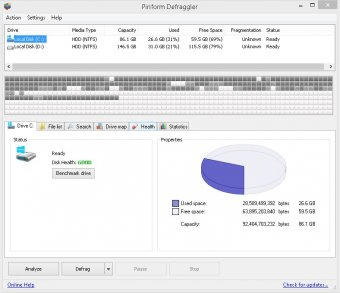
Defraggler is an advanced defragmenting tool. It is faster and more efficient than the default defragmenting option provided by Windows. Fragmentation of files is a headache on Windows systems, which results in slowing down of the system. Defragmenting tools comes handy in such situations, so as to organize and restructure the hard disk for maximum efficiency. Defraggler is capable of analyzing the logical drives for fragmentation of files, and then represent it graphically using a drive map as well as by a list which shows the number of fragments for each file. The top feature to be noted in Defraggler is its capability to defrag anything that you throw at it let it be a single file, group of files or folders, and even logical disk drives. Its defragmentation procedure is fast and efficient, too good to be ignored. Moreover, it has other options like defragmenting of free space, which is effective so as to prevent the occurrence of file fragmentation to a certain extent. Also, it can act as a disk checker to check the drives for errors. The data on drive is verified for integrity. A command line version is also provided in the default package, which comes in handy for experienced users. It also has the option to set the priority of the defragmenting process, so as to run it in background or to allow it to run with normal priority. To top it all, it is a freeware. Being a freeware, the defragmenting mechanism used is much better than the ones used in certain paid software. Defragmenting is recommended for every PC, its frequency depending upon the mode in which you use the PC. A slight increase in responsiveness of PC will be notable after the defragmentation.
Advantages
  • 1. Able to defrag file/folder/drive/free space.
  • 2. Fast, efficient, small in size and free.
  • 3. Easy to use.
Disadvantages
  • 1. Locks up any removable media, therefore Defraggler has to be closed before they could be removed (Using safely remove option).

Reviewed by: Farhan Anwar

Reviewer rating: Editor's rating 5

Screenshots

Main View Main View Defragmenting Hard Drive Defragmenting Hard Drive Options Menu Options Menu Features Features
All 7 screenshots

Latest comments

Guest #6227541(beginner) 2 months ago 
I love this piece of software, really does the job, and shuts down computer after it finishes! It will give your pc a mighty boost if like me, you often neglect to defrag your hd.
Guest #5649865(beginner) 3 months ago 
Disk Defragmenter is required for
Guest #2596707(beginner) 7 months ago 
Very Good software, in combination with anothers programs for cleaning your PC it makes one of the best tools avaibles for free.
Add new comment All 8 comments
Tag cloud
Download siClient

Email Address:

Password:

Register now »

Forgot password?

Copyright © 2009, Informer Technologies, Inc. About| Privacy and terms| Help| Feedback